
Creating a website that is easy to use for everyone is no longer optional. Businesses today must consider accessibility, performance, and search engine visibility to stay competitive online. One of the easiest ways to improve both accessibility and SEO is by installing a WordPress accessibility plugin.
At Baystate Marketing, we help businesses improve their websites with smart digital solutions, including accessibility improvements that enhance both search engine rankings and user experience. In this guide, we’ll explain how a WordPress accessibility plugin can benefit your website and why it should be part of your digital strategy
Why a WordPress Accessibility Plugin Matters for Modern Websites
A WordPress accessibility plugin helps make your website usable for people with disabilities, including those who rely on screen readers, keyboard navigation, or visual enhancements. Accessibility improvements ensure that every visitor can navigate your website easily.
Accessibility is also closely connected to SEO. Search engines like Google prioritize websites that provide better usability, structured content, and improved navigation.
When accessibility features are implemented correctly, they help:
- Improve website usability for all visitors
- Enhance navigation and readability
- Increase engagement and reduce bounce rates
- Support search engine indexing
These factors directly contribute to better SEO performance and stronger rankings in search results.
How a WordPress Accessibility Plugin Improves SEO
A well-configured WordPress Accessibility Plugin helps optimize several technical and usability elements that search engines consider when ranking websites.
1. Better Website Structure
Accessibility plugins help improve HTML structure, alt text support, and semantic content. These elements make it easier for search engines to understand your content and index your pages correctly.
Improved structure also supports internal linking strategies that strengthen SEO. For example, businesses looking to improve search rankings often combine accessibility improvements with professional SEO services.
2. Improved Page Usability
Google evaluates how users interact with your website. If visitors struggle to read content, navigate menus, or interact with elements, they may leave quickly.
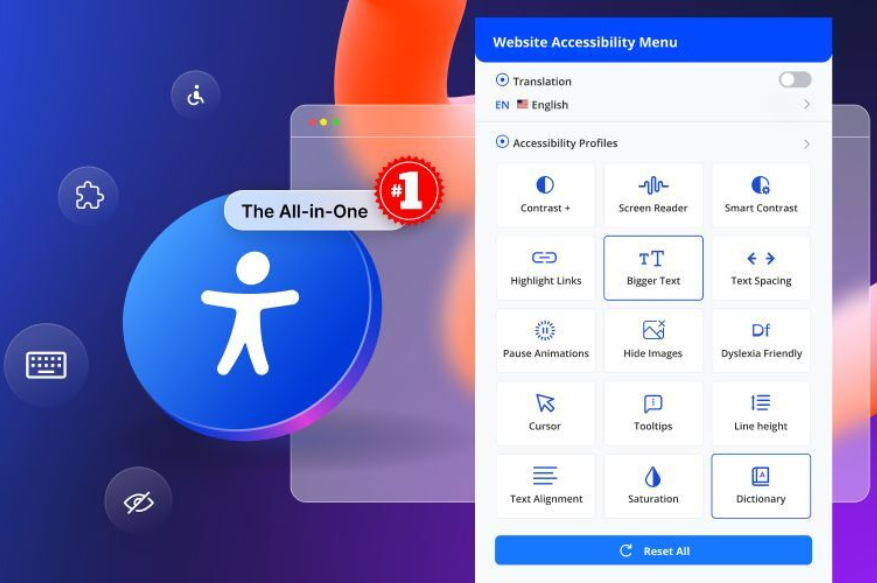
A WordPress accessibility plugin can improve usability by adding features such as:
- Text resizing tools
- Color contrast adjustments
- Keyboard navigation support
- Screen reader compatibility
These features create a smoother browsing experience, which can help improve engagement metrics like time on page and bounce rate.
3. Faster and Cleaner Website Performance
Many accessibility plugins streamline how content is presented on your website. Clean code and structured layouts help search engines crawl pages more efficiently.
When accessibility improvements are combined with proper website optimization, businesses can see improvements in search rankings and organic traffic.
Enhancing User Experience with a WordPress Accessibility Plugin
User experience plays a major role in how visitors perceive your brand. A website that is easy to navigate builds trust and encourages visitors to explore your services.
A WordPress accessibility plugin improves user experience in several ways.
Clearer Navigation
Accessibility tools ensure menus, buttons, and page layouts are easier to understand. This helps users quickly find the information they need.
For businesses investing in digital growth, combining accessibility with professional website development services ensures your website remains user-friendly and optimized for performance.
Improved Readability
Accessibility plugins allow users to customize text size, spacing, and contrast. This makes your website easier to read for visitors with visual impairments or those browsing on different devices.
Mobile-Friendly Interaction
Accessibility features also improve mobile usability. Mobile users benefit from clearer navigation, easier tapping, and better text visibility.
Since mobile usability is a key ranking factor, improving accessibility can indirectly boost mobile SEO performance.
Accessibility and ADA Compliance
Many businesses are now taking steps toward ADA-compliant websites. While a WordPress accessibility plugin alone does not guarantee full compliance, it can help address common accessibility challenges.
Accessibility improvements show that your business is committed to providing an inclusive online experience. This not only protects your brand reputation but also ensures that your website reaches the widest possible audience.
Why Businesses Choose Baystate Marketing for WordPress Accessibility Solutions
At Baystate Marketing, we help businesses improve their websites through accessibility improvements, SEO optimization, and digital marketing strategies.
Our team helps companies:
- Install and configure the right WordPress Accessibility Plugin
- Improve website structure and usability
- Optimize websites for search engines
- Enhance accessibility for better user engagement
Get Help Installing the Right WordPress Accessibility Plugin
Contact Baystate Marketing today to learn how the right A WordPress accessibility plugin can improve your website’s SEO performance and user experience.